Want to build a profitable online income stream without spending a single penny on web hosting, premium domains, or complex site design?
Learning how to start Pinterest affiliate marketing without a website is currently one of the most accessible pathways to building sustainable passive income online.
Most traditional digital business models require significant upfront financial investments, coding knowledge, or months of writing lengthy articles. However, visual search engines operate on a completely different framework. On platforms like Pinterest, users actively log in with a distinct buying intent—specifically searching for product recommendations, gift ideas, tools, and lifestyle inspiration.
In this ultimate guide, we will break down the exact strategy you need to launch a profitable Pinterest affiliate marketing system from scratch without building or maintaining a blog.
Quick Summary (Featured Snippet Zone)
To succeed with Pinterest affiliate marketing without a website, follow this quick roadmap:
- Step 1: Establish a free Pinterest Business Account and claim your visual niche.
- Step 2: Apply to beginner-friendly affiliate networks like Amazon Associates, Impact, or ShareASale.
- Step 3: Design high-converting 2:3 vertical pins (1000 x 1500 px) using Canva.
- Step 4: Insert your original, unshortened affiliate tracking URL directly into the Pin destination link box.
- Step 5: Maintain strict FTC compliance and prevent sudden account bans by adding #affiliate or #ad tags to your descriptions.
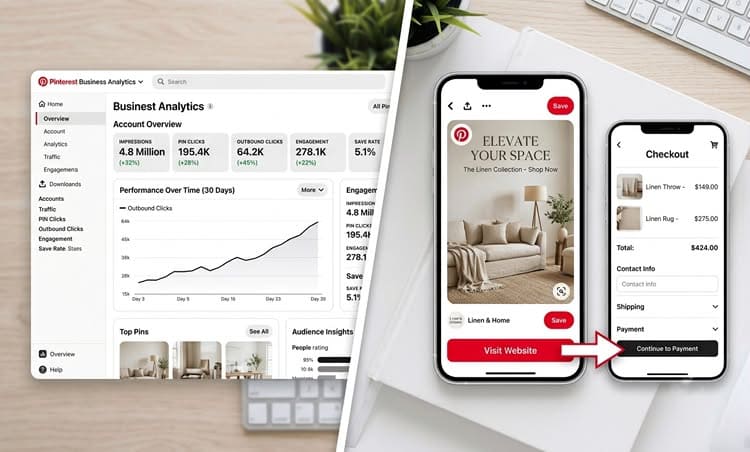
Why Pinterest Is Superior for Beginners (The Math Behind It)
Traditional social media platforms like Instagram, TikTok, and X (formerly Twitter) rely on continuous, algorithmic feed rotation. A typical tweet or post loses its organic reach within 24 to 48 hours.
Pinterest is fundamentally different because it operates as a Visual Search Engine, working much like Google.
- Social Media Post Lifetime: ── [24 – 48 Hours]
- Pinterest Pin Lifetime: ──────────────────────── [3 – 6+ Months]
Key Advantages of Visual Search:
- Extended Content Lifespan: A single well-optimized pin can continuously collect impressions, link clicks, and affiliate commissions for 6 to 12 months after publishing.
- High Buyer Intent: Over 80% of weekly active Pinterest users report discovering entirely new products, trends, or brands on the platform before finalizing a purchase.
- No Follower Barrier: Pinterest relies heavily on Keyword Search Optimization rather than established follower networks. An account with zero followers can still attract thousands of monthly views if the pin SEO matches popular, high-volume search queries.
Step 1: Choosing a High-Converting Visual Niche (Low Competition)
Because Pinterest relies strictly on graphics, certain categories convert at a drastically higher rate than others. Choosing a niche with high visual appeal is critical for driving click-through rates (CTR) on your affiliate links.
Top Performing Niches on Pinterest for 2026:
- Home Decor & Desk Setups: Ergonomic office spaces, smart ambient lighting, aesthetic desk accessories.
- Personal Finance & Side Hustles: Digital planners, budgeting templates, printable productivity trackers.
- Fashion & Beauty: Seasonal capsule wardrobes, skincare routines, outfit curation guides.
- Tech Accessories & Smart Gadgets: Minimalist phone cases, cable management systems, smart home accessories.
- Fitness & Wellness: Home workout gear, physical meal planner templates, yoga accessories.
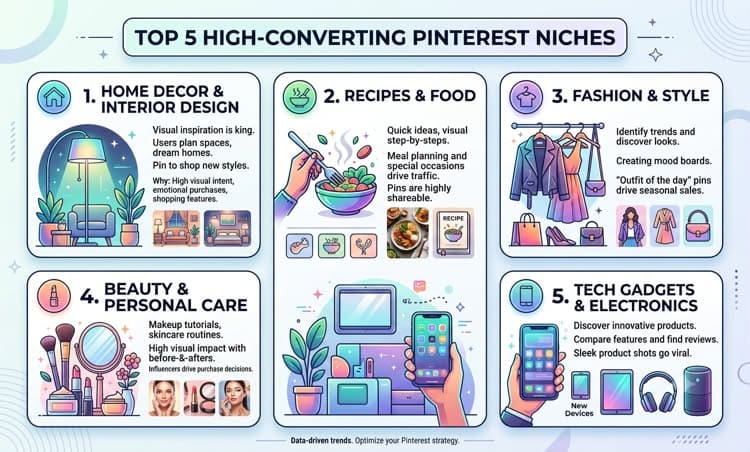
I’m currently running three Pinterest accounts in three different niches: fashion, home decor, and personal finance. My fashion account is taking off like a rocket, haha! I got 2M+ impressions in my very first month. I also wrote a step-by-step guide explaining exactly how I achieved it, along with proof. You can check out my article: “How I Hit 1.5M+ Pinterest Impressions in 30 Days Easily.“
Step 2: Setting Up Your Pinterest Business Infrastructure
To access granular backend analytics, track performance, and optimize your pins for maximum search reach, you must operate through a free Business Profile.
How to Configure Your Infrastructure for Virality:
Create Your Profile: Navigate to Pinterest and establish a new account (or instantly convert your existing personal account to a Business Profile for free).
Optimize Profile Name: Combine your core brand name with your primary target keywords.
Example: TechHQ | Desk Setups & Smart Home Gadgets
Draft Profile Bio: Write a concise, 2-sentence bio naturally incorporating targeted search phrases.
Establish Relevant Boards: Build 5 to 8 public boards focused tightly on specific micro-topics.
Board 1: Minimalist Desk Setups
Board 2: Work From Home Productivity Gadgets
Board 3: Aesthetic Workspace Ideas
Step 3: Finding Affiliate Networks That Allow Direct Pinning
Not all affiliate networks treat direct social media linking the same way. You must select platforms that explicitly allow direct pinning without requiring an intermediary landing page.
| Affiliate Network | Primary Product Types | Direct Linking Permitted? | Payout Methods |
| Amazon Associates | Physical goods, tech, lifestyle | Yes (Strict disclosure required) | Direct Deposit / Gift Cards |
| Impact Radius | Software, SaaS, major consumer brands | Yes | PayPal / Direct Transfer |
| ShareASale | Fashion, home decor, digital assets | Yes | Check / Wire / PayPal |
| ClickBank | eBooks, online courses, software | Yes | Payoneer / Direct Deposit |
| Etsy Affiliate | Digital printables, handmade items | Yes | Direct Deposit |
⚠️ Critical Guideline: Never use link shorteners (like Bitly or TinyURL) or link cloakers on Pinterest. The platform’s advanced spam algorithm instantly flags masked URLs, which can lead to permanent account suspension. Always utilize the raw, unshortened URL provided by your affiliate dashboard.
Step 4: Designing High-Click-Through (CTR) Pins on Canva
Your image graphic acts as your digital storefront window. If the graphic fails to grab attention immediately, users will simply scroll past.
Anatomy of a High-Converting Pin:
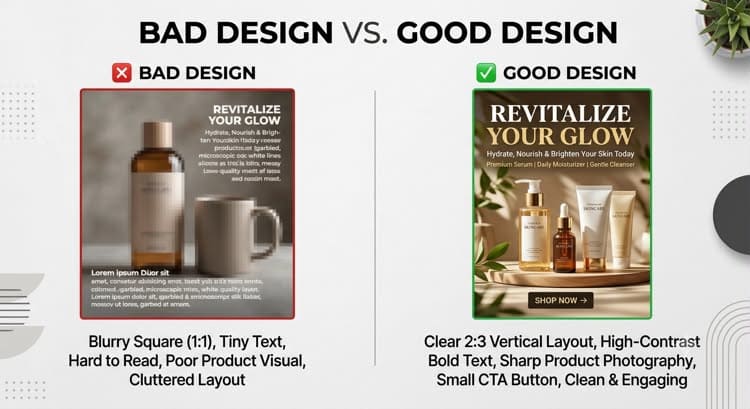
- Dimensions: Always use a 2:3 vertical ratio (1000 x 1500 pixels). Horizontal or square images receive drastically lower distribution from the algorithm.
- Text Overlay: Use large, clear, high-contrast typography that directly addresses and solves a specific user problem.
- ❌ Weak Headline: “Cool Desk Items”
- ✅ Strong Headline: “10 Minimalist Desk Gadgets Under $50 You Didn’t Know You Needed”
- Multiple Design Variations: Never rely on just one design layout. Create 3 to 4 visually distinct pins (altering background colors, fonts, or image angles) targeting the exact same affiliate product to split-test virality.
Step 5: Pinterest SEO & Direct Link Insertion
Once your pin visual is polished, uploading it with comprehensive Search Engine Optimization ensures it is indexed correctly to reach active buyers.
Step-by-Step Publishing Process:
- Click Create Pin inside your Pinterest Business Suite dashboard.
- Upload your 1000 x 1500 px visual graphic file.
- Draft Pin Title: Include your target long-tail keyword naturally (e.g., “Best Ergonomic Home Office Setup Ideas”).
- Write Pin Description: Draft 2 to 3 engaging sentences naturally weaving in secondary search terms.
- Add Affiliate Disclosure: To remain completely transparent and legally compliant, explicitly add #affiliate or #adto the very end of your description text.
- Insert Destination Link: Paste your original, unshortened affiliate tracking link directly into the URL field.
- Select your highly relevant target Board and hit Publish.
3 Critical Account Safety Rules to Prevent Bans
Many beginners get their Pinterest accounts suspended within the first week due to automated spam filters. Follow these guidelines to protect your assets:
- Maintain Pin Ratios: Avoid pinning 100% affiliate links continuously. Blend in helpful, informational non-affiliate content, saved ideas, and original tips. A safe guideline is keeping a ratio of 70% affiliate pins and 30% organic value pins.
- Pacing and Scheduling: Never upload 20 pins simultaneously. Spread out your activity smoothly by using Pinterest’s built-in scheduler to publish 2 to 4 pins per day.
- Avoid Repetitive Spamming: Do not pin the exact same affiliate link across 10 different boards within a 5-minute window. Space out repeat destination links across several days or weeks.
Frequently Asked Questions (FAQs)
Yes. Amazon Associates allows direct affiliate links on approved social platforms, including Pinterest. However, you must explicitly disclose the partnership using #affiliate, and ensure your Pinterest profile link is listed inside your Amazon Associates account dashboard.
Zero. Pinterest distributes content based on user search intent, keywords, and relevance rather than follower counts. Fresh accounts regularly earn their first commissions within weeks before ever hitting 100 followers.
Pinterest utilizes a specific indexing phase. Fresh pins typically take 2 to 4 weeks to be thoroughly analyzed and indexed by the algorithm before showing up consistently in user search queries.
Conclusion & Next Steps
Starting Pinterest affiliate marketing without a website removes technical hurdles and startup costs, allowing you to focus entirely on visual creation and keyword strategy. By selecting a clear niche, designing clean graphics on Canva, and consistently applying Pinterest SEO, you can successfully build a highly scalable passive income stream.