
Hey there! Let’s Talk About That Scary Pinterest Drop
Ever opened your Pinterest analytics dashboard, stared at the graphs, and felt your heart drop straight into your stomach? One day you are riding high on thousands of daily views, getting all happy seeing your blog traffic spike, and the next day—boom. Your graph is flatter than a pancake. Total silence. Zero outbound clicks.
If your pins have suddenly vanished from the home feed like they never existed, you might be dealing with the dreaded Pinterest shadowban.
Don’t panic, take a deep breath, and grab a cup of coffee. Today, we are going to break down this whole messy situation in simple, easy-to-understand way. We’ll look at what a shadowban actually is, how to check if it happened to you, why Pinterest’s algorithm got mad at you in the first place, and—most importantly—how to fix it fast so your traffic comes rushing back.
Let’s dive right in and solve this problem together!
Shadowbanned on Pinterest
What on Earth is a Pinterest Shadowban?
Let’s clear the air. A shadowban is basically the digital equivalent of someone putting a sticky note on your forehead that says “Ignore Me,” but without telling you they did it.
When you get shadowbanned, Pinterest quietly suppresses your account’s visibility. They don’t send you an official warning email. They don’t lock you out of your account, and your profile doesn’t show a big scary red warning banner. Everything looks normal on your end:
- You can still log in easily.
- You can still upload new pins.
- Your pins still sit happily on your boards when you look at your profile.
The catch? The algorithm completely stops showing your content to anyone else. Your pins disappear from the home smart feed, and they stop showing up in search results. You are shouting into an empty room where nobody can hear you. Frustrating? Absolutely. Permanent? Usually not, if you handle it right.
3 Easy Ways to Check If Your Blog is Shadowbanned
Before you start pulling your hair out over regular algorithm changes, let’s run a quick diagnostic check. Is your account actually shadowbanned, or is it just a slow Tuesday? Let’s check using three simple methods.
Method 1: The Incognito Window Trick (The Best Test)
The absolute easiest way to test your account visibility is to see how regular users see you when you aren’t logged in.
- Open up a brand new Incognito or Private Browsing Window in your web browser (Chrome, Safari, Firefox—doesn’t matter).
- Go to the Pinterest homepage and use the search bar to look up your exact Pinterest username or profile link.
The Verdict: If your profile, pins, and boards completely fail to show up in search results while you are logged out, your account visibility has definitely been restricted. If you show up just fine, you are probably dealing with a normal traffic dip instead.
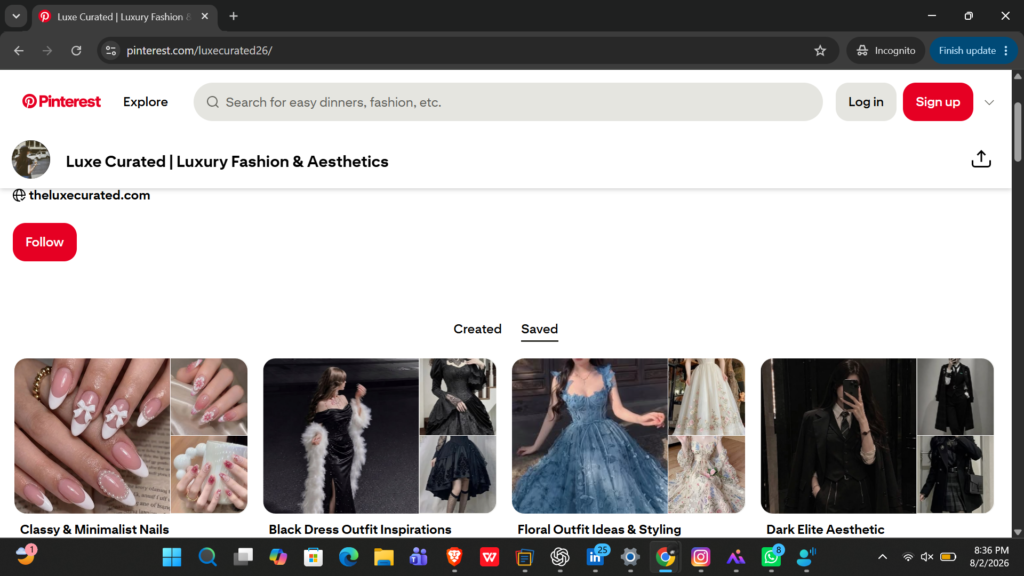
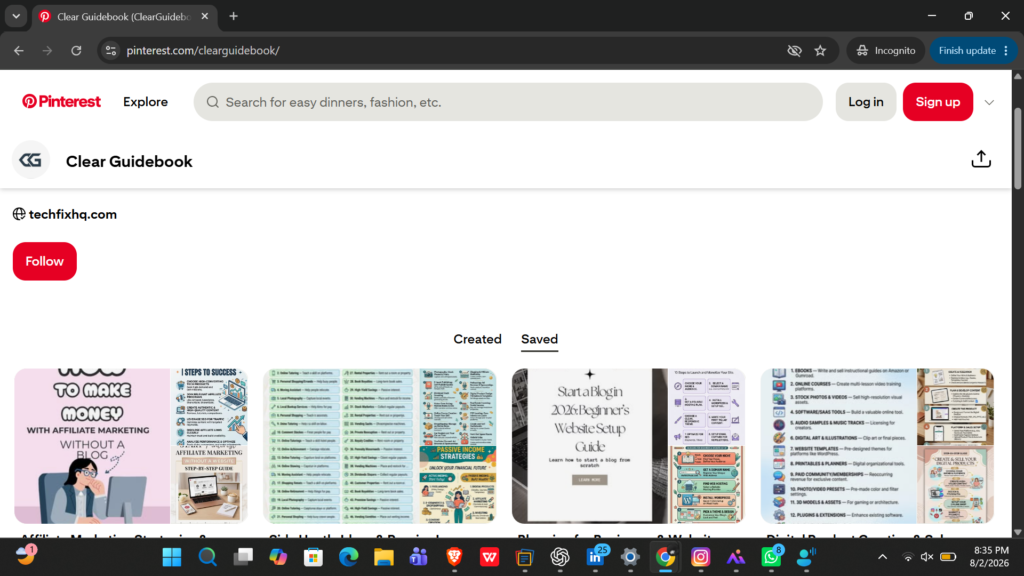
Here’s how to check it. You can see that both of my accounts are visible, including all the boards, and everything is fine because they are not restricted.
I actually added screenshots from my fashion account in this blog because it’s an older account (around 3–4 months old), compared to my other account. I created this account with the techfixhq.com website only about 15 days ago, so its stats are still very new. That’s why it hasn’t started getting much traffic yet.
I am writing this on 8 August 2026.
Method 2: Check Pinterest Analytics for the “Cliff Drop”
Normal algorithm fluctuations happen all the time to every blogger out there. You might see a 10% or 20% dip over a week because people are outside enjoying the weekend. A shadowban, however, looks completely different.
- Head over to your Pinterest Analytics tab.
- Take a close look at your total monthly impressions or daily views graph over the last month.
The Verdict: If your impression graph drops like a vertical brick wall over a 24 to 48-hour window—usually taking a sudden 90% plus nose-dive straight to absolute zero—that is the classic signature of a shadowban.
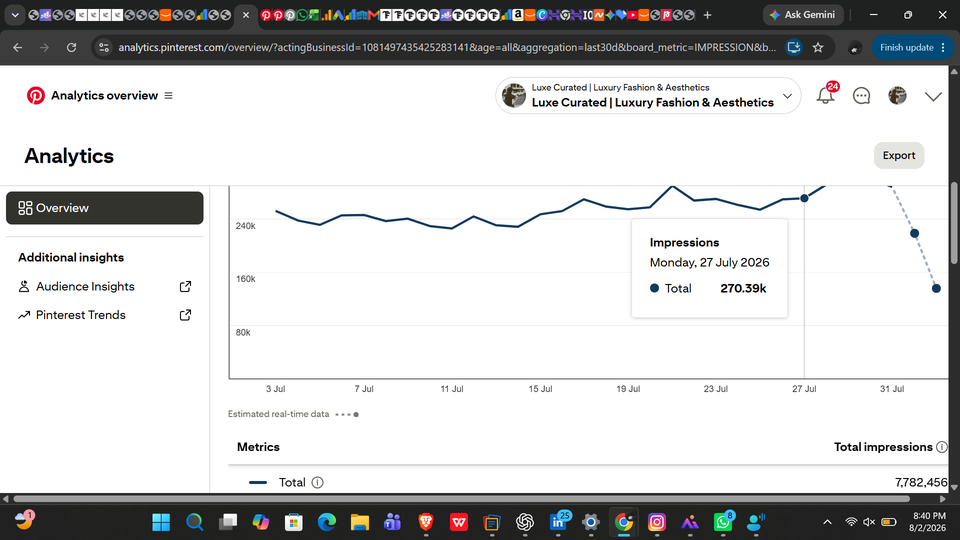
As I love to share in my case studies, a healthy graph looks like a rolling wave with natural peaks and valleys. A shadowban, on the other hand, looks like a sheer drop-off cliff. Take a look at my other fashion account above pulling in over 7 million monthly impressions—that is what a thriving, unblocked algorithm curve actually looks like! If your graph looks like that, you are totally safe. If it looks like a flatline, keep reading.
I get 200K+ impressions per day on my account, but that doesn’t mean your account is doing badly if you’re getting 50K impressions per day. It also doesn’t mean your account is shadowbanned. Just make sure your graph looks like mine, not your impression count. Every account grows at a different pace.
By the way, if you want your pins to reach more people and get more impressions, I’ve written a complete step-by-step guide about it: How I Hit 1M+ Pinterest Impressions in first 30 Days (Easily) It covers everything I did, from setting up my account to growing it with proven strategies.
Method 3: The Keyword Search Test
Pick a very specific, unique title of a pin you published recently. Log out of your account, go to Pinterest search, and type that exact title into the search bar under the “Pins” tab. Scroll down a bit. Can you find your pin anywhere? If your pin is totally missing from search index results even though it’s weeks old, your account’s distribution power has been turned off.

My pin showed up at the top, and I didn’t even have to scroll when I searched using the exact title because it’s performing well. You may need to scroll if you don’t see yours at the top.
However, if you scroll down and still can’t find your pin, then your account’s distribution power has most likely been turned off.
Why Did Pinterest Shadowban Your Account? (Common Mistakes)
Let’s be honest: Pinterest’s automated spam filters are notoriously strict. I already lost one of my accounts. It got suspended when it had 5M monthly impressions because I added the same blog post link to more than 10 different pins on the same day. It was suspended and I never got it back. Maybe Pinterest thought I was using a bot or doing spammy activity—I honestly don’t know. Ever since then, I’ve been very careful with everything. 😅I also don’t want any of you to repeat the same mistake I made.
Sometimes they act like an overprotective parent who panics over nothing. If you triggered a penalty, it was likely due to one of these common creator mistakes:
- Spamming Too Many Pins Too Fast: Uploading way too many pins in a single 24-hour period (especially identical pins pointing to the exact same URL). Quality, breathing room, and natural spacing matter way more than raw volume nowadays.
- Overusing the Same Destination URL: If you pin 30 times a day straight to a brand-new blog post using the exact same affiliate or blog link over and over again, the algorithm mistakes you for an automated bot and flags your account.
- Using Unauthorized Automation Tools: Relying on sketchy third-party pinning bots or auto-schedulers that violate Pinterest’s current API terms of service. If Pinterest catches a bot interacting with your account, they lock down your visibility fast.
- Aggressive Re-pinning: Mindlessly re-pinning other creators’ content or old pins at a high frequency without adding fresh, unique context or new visual designs. Pinterest wants original creator energy, not recycling loops.
- Broken or Spammy Affiliate Links: Pinning direct, cloaked redirect links or spammy affiliate networks that trigger security warnings across multiple user reports.
I’ll keep updating this post over time if Pinterest changes any of its policies or introduces new updates. So, make sure to save this pin to one of your Pinterest boards and follow me so you don’t miss any future updates.
How to Fix a Pinterest Shadowban Fast (Step-by-Step Recovery Plan)
Getting hit with a shadowban feels awful, but don’t worry—it is almost never permanent if you clean up your act and give the system some time to heal. Follow this step-by-step recovery plan to get your account back into Pinterest’s good graces:
Step 1: Stop Pinning for 48 to 72 Hours
First things first: give the algorithm a breather! Hit a complete, total pause on manual pinning, scheduling apps, and link sharing for at least 48 to 72 hours. Let your account completely cool down so the automated filters can reset your trust score. Step away from the dashboard and let it rest.
Step 2: Clear Browser Cookies and Cache
Sometimes your local browser session caches restricted or flagged tokens. Clear your browser cookies and cache, or completely log out of all Pinterest sessions across your laptop, phone, and tablet before logging back in with a fresh session.
Step 3: Disconnect Third-Party Automated Apps
Head over to your Pinterest account settings under Security and Permissions or Apps. Take a good, honest look at the list. Are there any old schedulers, unverified automation software, or suspicious third-party apps connected to your account? Revoke their access immediately. Only keep official, trusted partners connected.
Step 4: Clean Up Your Recent Board Activity
Go through your last few days of pins. If you pinned the exact same image 10 times in a row across different boards, delete the duplicates. Keep only a clean, well-spaced footprint. Make sure your profile looks like it is managed by a real human being sharing diverse, interesting topics, not a spam machine.
Step 5: Send a Polite Appeal to the Pinterest Help Center
If you are confident that you didn’t break any rules and that your account was caught in the spam filter by total mistake, you can manually reach out to support.
Use this ready-to-copy professional appeal script to contact them:
Subject: My Pins are Not Indexing in Search Engine – Requesting Account Review
Body: Hello Pinterest Support Team,
I am the owner of the website [YourWebsite.com] connected to my Pinterest creator account @[YourUsername]. Recently, I noticed a sudden and drastic drop of 95%+ in my impressions and traffic within a 48-hour window, which looks like a technical glitch or filter issue.
My pins are no longer showing up in the Pinterest search feed, even when searched with exact titles. I always make sure to follow Pinterest’s Community Guidelines closely and strive to create high-quality, original vertical pins for my audience.
It seems my account might have been accidentally caught in the spam filter. Could you please manually review my account and lift this restriction?
Thank you so much for your time and assistance.
Best regards, [Your Name]
Pro-Tips to Prevent Future Shadowbans
Once your traffic recovers (which usually takes anywhere from a few days to two weeks after you fix your habits), you want to make sure you never have to deal with this headache again. Keep these golden rules in mind moving forward:
- Spread Out Your Schedule: Instead of dropping 50 pins in one single hour, space them out evenly throughout the day using a trusted scheduler or natural manual pinning habits (e.g., 5 to 10 high-quality pins spread across the day).
- Vary Your Destination Links: Don’t point every single pin to the exact same blog post. Mix it up! Link to different articles, categories, and resources on your site.
- Focus on Fresh Content: Pinterest loves fresh images. Spend a little extra time in Canva designing new, gorgeous vertical graphics with clear fonts and bright colors instead of reusing the exact same image forever.
- Avoid Shady Shortcuts: Stay away from cheap automation tools promising “10,000 repins overnight!” Pinterest is way too smart for that, and shortcuts always end up costing you your hard-earned traffic in the long run.
Final Thoughts
Getting hit with a shadowban can feel like a punch to the gut, especially when you pour your heart and soul into growing your blog organically. But remember: it is almost never permanent if you correct your workflow right now.
Cut out aggressive spam tactics, focus on creating gorgeous, high-value fresh pins, give the platform a few days to reset your standing, and don’t panic. Stay consistent, keep your account clean, and your traffic will bounce right back stronger than ever! You’ve got this!