If you are reading this, I already know the exact panic you are feeling right now. You opened your Pinterest Analytics, looked at that chart, and saw a dramatic nose-dive. Your impressions—which used to look like a healthy, growing mountain—now look like a cliff.
Trust me, I have been there. Watching your numbers collapse overnight feels like watching your hard-earned website traffic get pulled out from under your feet. But before you lose your mind or delete your account, take a deep breath.
A sudden drop in Pinterest impressions is one of the most common issues bloggers and creators face. The good news? It is almost always fixable.
In this ultimate guide, we are going to break down why your Pinterest impressions dropped suddenly, how the algorithm actually views your content, and the exact step-by-step recovery strategy to bring your traffic back to life. Grab a cup of coffee, sit back, and let’s fix your account together!
Why Your Pinterest Impressions Dropped Suddenly
How the Pinterest Algorithm Actually Works
Before we jump into fixing the issue, we need to talk about how Pinterest operates behind the scenes.
Pinterest is not a regular social media platform. It is a visual search engine. Just like Google, Pinterest relies on complex systems, automated spam filters, and user engagement signals to decide which pins get shown and which ones get hidden in search results.
Pinterest ranks your content based on four core factors:
- Domain Quality: How trustworthy, fast, and secure your connected website is.
- Pin Quality: How visual, engaging, and high-CTR your pin designs are.
- Pinner Quality: How consistent you are and whether your account looks human or spammy.
- Topic Relevance: How clearly your SEO keywords match what users are searching for.
When your impressions drop, it simply means Pinterest’s algorithm has temporarily downgraded one or more of these trust metrics for your profile.
Impressions vs. Outbound Clicks
- Impressions: The total number of times your Pin was shown on a user’s screen (Home Feed, Search, or Related Pins).
- Outbound Clicks: The number of times someone actually clicked through your Pin to visit Your website.
A drop in impressions means your content is losing visibility, which naturally destroys your outbound traffic. Let’s look at the hidden reasons why this happens.
If your impressions dropped to absolute zero overnight, it might not just be a glitch—you could be facing a shadowban. Check out our step-by-step guide on how to know if you are shadowbanned on Pinterest to run a quick diagnostic on your account.
8 Major Reasons Why Your Pinterest Impressions Dropped
1. The Automated Spam Filter Triggered
Pinterest uses strict automated filters to fight spam. If you post too quickly, save the same link repeatedly, or use external automation tools incorrectly, the system flags your account.
The worst part? Pinterest won’t always warn you. They won’t send an email saying your reach is restricted—they just dial back your distribution to zero quietly behind the scenes.
2. You Are Pinning the Same URL Too Often
Gone are the days when you could pin the same link 10 times a day across 20 different group boards. Today, Pinterest heavily favors Fresh Content. If you keep creating slight visual variations of the exact same URL every single day, Pinterest treats it as duplicate spam.
3. Recent Algorithm Updates
Just like Google pushes core updates, Pinterest updates its algorithm multiple times a year. When an update rolls out, the algorithm reshuffles content rankings. What worked three months ago might suddenly stop working today.
4. Poor Keyword Placement (Lacking Long-Tail SEO)
If your Pin titles and descriptions only use generic terms like “Cool Tech Hacks” or “Pinterest Tips“, you are competing with millions of established creators. If you aren’t targeting specific long-tail keywords (like how to get more outbound clicks on Pinterest without ads), the system struggles to categorize your content properly.
5. Board Irrelevance
Are you pinning your guides to a board titled “Random Stuff”? If your Pin topic does not match your Board title and description, Pinterest gets confused about who should see your Pin.
6. Seasonal Shifts in Traffic
Traffic naturally fluctuates throughout the year. For instance, home decor and gift guides spike during winter, while outdoor tech or specific apps peak at different times. A drop might just be a natural market shift rather than an algorithm penalty.
7. Technical Website Issues
Did you change your domain recently? Is your website loading slowly? Did your SSL certificate expire? If Pinterest detects that users are bouncing back immediately due to a slow site, it will lower your domain authority score.
8. Temporary System Glitches
Sometimes, it is not your fault at all! Pinterest occasionally experiences backend analytics bugs where impression charts drop artificially, even though actual site traffic remains completely stable.
Step-by-Step Action Plan: How to Recover Your Traffic
Now that we know what went wrong, let’s fix it. Follow this simple recovery roadmap carefully.
Step 1: Perform an Account Audit
The first thing you need to do is open your Pinterest Analytics dashboard to identify where the leak is coming from.
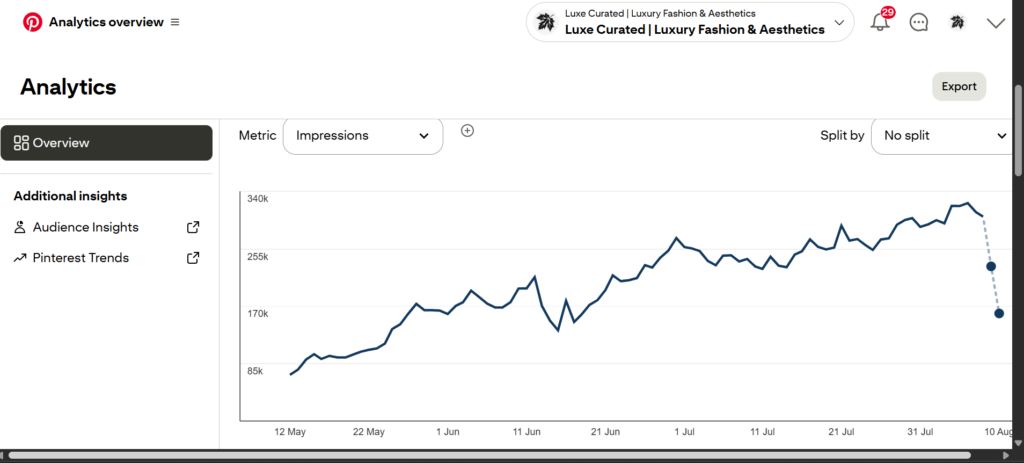
The screenshot is from my fashion account. There’s a slight drop around June 15–16, but it’s not much and is completely normal, so it’s not actually shadowbanned.
Check if your drop happened suddenly on a specific date, or if it was a slow bleed over several weeks:
A Sudden Vertical Drop (Overnight): Usually indicates a shadowban or automated spam filter flag.
A Slow Gradual Decline: Indicates outdated keyword targeting or a lack of fresh content.
Step 2: Fix Your Board Structure and SEO
Make sure every single board on your profile has a clean, hyper-focused niche topic.
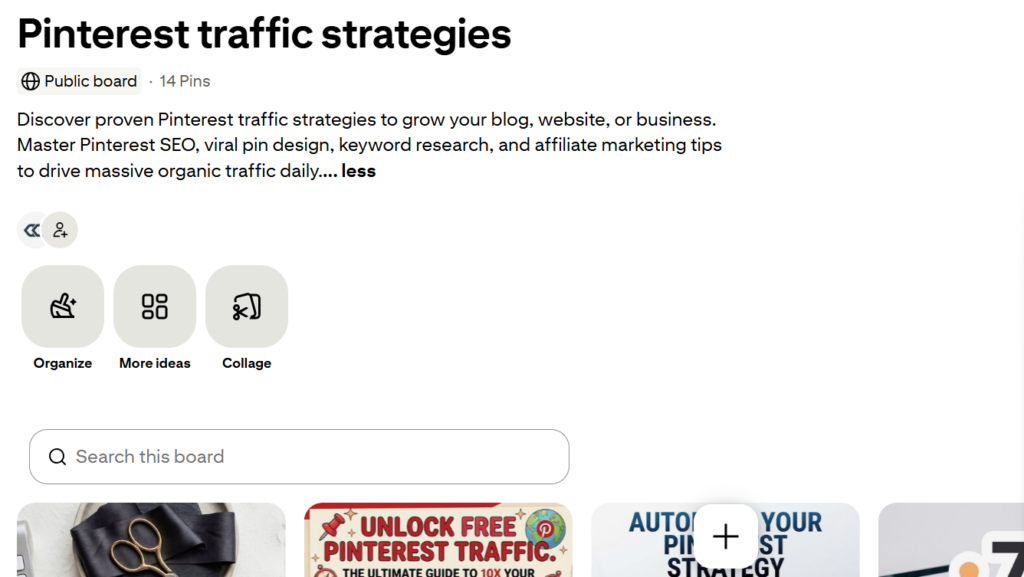
Add targeted descriptions: Rewrite board descriptions using natural sentences that incorporate low-competition search phrases. Just like I did, as shown in the screenshot.
Clean up low-performing boards: If you have ancient boards that don’t relate to your core niche, set them to Private (Secret).
Step 3: Shift to Fresh Creative Pin Templates
Pinterest loves brand-new visuals. A Fresh Pin means an image or video that Pinterest has never seen before. Simply changing the font color on an old background image does NOT count as a fresh pin.
Here is a quick checklist for creating high-performing, high-CTR Pins:
Aspect Ratio: Always use a 2:3 vertical ratio (1000 x 1500 pixels).
Text Overlay: Use large, high-contrast typography that is easy to read on mobile devices.
Avoid Generic Stock Images: Use unique visual setups, clean screenshots, or custom graphic layouts.
Step 4: Master Long-Tail Keyword Targeting
To rank quickly in Pinterest search results, you must target specific long-tail phrases that match exact user intent.
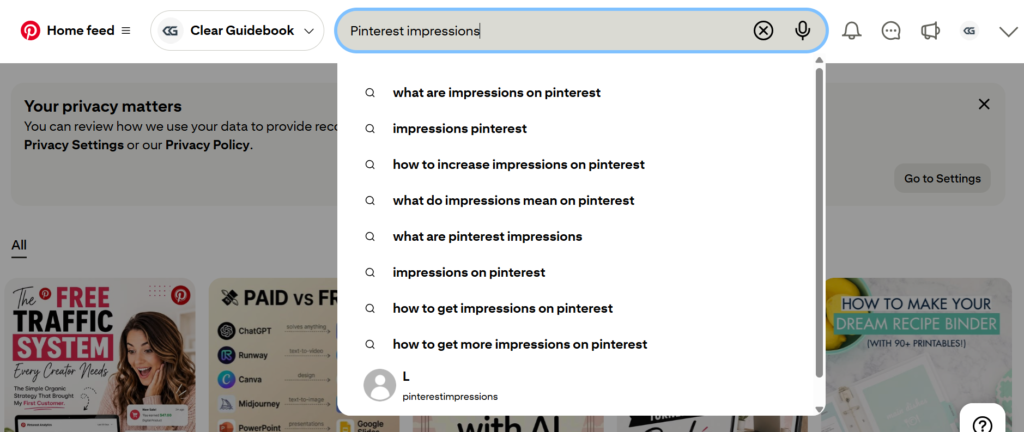
See the “Most searched” section? This is where we get long-tail keywords.
High-Intent Long-Tail Keywords to Target:
- how to fix sudden pinterest traffic drop fast
- why are my pinterest pins getting zero impressions
- step by step pinterest seo strategy for beginners
- how to recover suspended pinterest business account
- how to get high outbound clicks on pinterest
Sample High-CTR Pin Description:
Wondering why your Pinterest impressions dropped overnight? Don’t panic! Learn the exact reasons behind sudden traffic drops, how to fix automated spam flags, and a step-by-step Pinterest SEO recovery strategy to get your website traffic back fast.
Step 5: How to Contact Pinterest Support (Copy-Paste Template)
If your impressions have dropped to literally zero across all pins, your account may have been caught in a false-positive spam sweep. In this case, you need to reach out to Pinterest Support directly.
Click here to contact Pinterest Support directly.
Use this tested message template when contacting support:
Subject: Urgent: Account Impressions Dropped to Zero / Spam Filter Issue
Message:
“Hi Pinterest Support Team,
I am reaching out regarding my business account [Your Account Name / Link]. Recently, I noticed a dramatic, sudden drop in my pin impressions and reach.
I review all Pinterest Content Guidelines regularly, and I work hard to publish original, high-quality content that provides real value to users. I do not use unauthorized automation tools or spam techniques.
Could you please check if my account was accidentally flagged by an automated filter? I would deeply appreciate your help in reviewing my account status so I can continue sharing great content with the community.
Thank you for your time and assistance!
Best regards,
[Your Name]”
Golden Rules to Prevent Future Drops
Recovery takes a bit of time (usually 1 to 3 weeks after fixing your strategy), but consistency is key. Keep these rules in mind moving forward:
1. Quality over Quantity: Post 2–5 high-quality, fresh pins daily instead of spamming 20 mediocre ones.
2. Space Out Your Links: Never post the exact same URL back-to-back on multiple boards within hours.
3. Focus on Curiosity Titles: Craft compelling headlines that provoke interest so readers want to click through to your blog.
4. Monitor Weekly Metrics: Keep a close eye on your weekly analytics so you can catch sudden trend shifts early.
Don’t let a temporary dip ruin your momentum. Treat this as a chance to clean up your account, refine your SEO strategy, and build a stronger, more resilient traffic engine for yiur site.
Now, go audit your account, publish fresh pins, and watch those numbers climb back up!