
If you have ever posted dozens of beautiful pins on Pinterest only to get single-digit views, you are definitely not alone. I used to be in the exact same boat. I spent hours designing gorgeous graphics, picking aesthetic color palettes, and uploading them with high hopes, only to watch my traffic flatline.
It was frustrating, to say the least. But then I realized something crucial: Pinterest is not just a social photo app. It is a visual search engine.
If you want people to find your pins, you have to treat Pinterest like Google. That means doing real keyword research. In 2026, one tool has completely changed the game for creators, bloggers, and business owners looking for low-competition terms: Pinclicks.
In this beginner-friendly guide, I am going to walk you step-by-step through how to use Pinclicks for Pinterest keyword research so you can start ranking your pins faster, grabbing organic traffic, and growing your account without losing your sanity.
Pinclicks for Pinterest Keyword Research
Why Pinterest Keyword Research is Different in 2026
Before we dive into Pinclicks itself, let’s talk about why standard keyword research tools often fail on Pinterest.
Google keyword research focuses on text-based questions, search intent, and traditional web pages. Pinterest search, on the other hand, is driven by visual discovery, personal aesthetics, lifestyle inspiration, and shopping intent. People do not search on Pinterest the same way they search on Google.
On Pinterest, users search in short phrases or specific visual ideas like old money winter outfit aesthetic or cozy small bedroom decor ideas.
For years, beginners had to rely solely on the native Pinterest search bar autosuggestions or the Pinterest Trends tool. While those are helpful starting points, they don’t give you exact numbers. You are basically guessing which terms actually get high search volume and which ones are oversaturated with competition.
That is where Pinclicks comes in. It takes the guesswork out of Pinterest SEO by giving you real search data, competition levels, and related long-tail keywords in one easy-to-use platform.
What is Pinclicks and Why Should Beginners Care?
Pinclicks is a specialized keyword research and analytics tool specifically built for Pinterest. Think of it as your secret weapon for finding hidden search queries that big creators have not dominated yet.
Here is why it is especially great if you are a beginner looking to rank quickly:
- Finds Low-Competition Long-Tail Keywords: Instead of targeting huge, broad phrases like fashion tips where you will get buried, Pinclicks helps you find long-tail keywords like minimalist neutral capsule wardrobe 2026 that are much easier to rank for.
- Shows Real Search Demand: You can see which trends are climbing right now so you can create content ahead of time.
- Saves Hours of Manual Searching: Instead of typing fifty different variations into the Pinterest search bar and writing them down by hand, Pinclicks generates lists of high-performing terms in seconds.
- Reveals Content Gaps: It shows you what users are actively searching for that does not have enough high-quality pins yet.
Keyword research is only half the battle! Read my full case study on how I hit 7M+ Pinterest impressions in 30 days to see how I combine keyword research with visual pin design for massive viral reach.
Step-by-Step Guide: How to Find Long-Tail Keywords Using Pinclicks
Let’s get into the practical side. Here is the exact process you need to use to find high-traffic, low-competition keywords using Pinclicks so your pins get discovered fast.
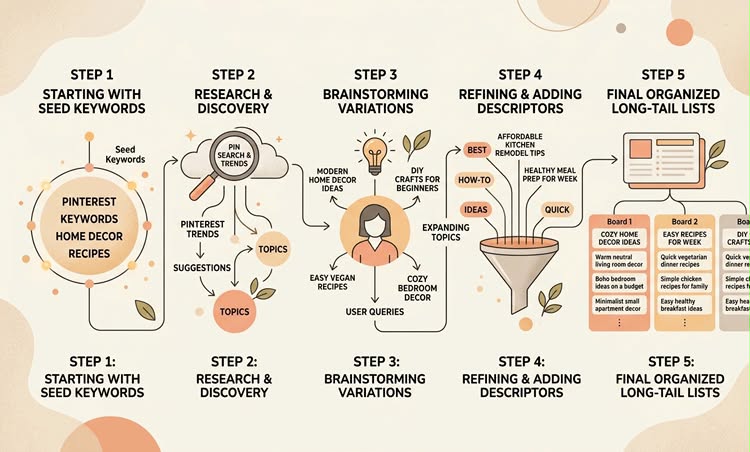
Step 1: Start with a Broad Seed Keyword
First, think about the core topic of your blog post or product. Keep this simple. For example, if you write about interior design, your seed keyword might be living room decor or cozy home. If you write about style, it might be silk dress.
Type your broad topic into the search bar in Pinclicks.
Step 2: Analyze the Search Volume and Trend Data
Once Pinclicks generates the results, do not just pick the keyword with the highest search number. Broad keywords like home decor have millions of searches, but thousands of massive accounts are competing for them.
Look at the search volume trends over the last few months. You want topics that show steady interest or positive upward momentum for 2026.
Step 3: Dig into Long-Tail Suggestions
This is where the magic happens. Look for multi-word phrases (3 to 5 words long) that describe a very specific interest or problem.
For instance, instead of picking satin dress, Pinclicks might show you long-tail keywords like:
- emerald green satin dress outfit ideas
- casual summer satin silk midi dress
- how to style satin dress for winter
These long-tail keywords have specific search intent. When a user types a specific 5-word phrase into Pinterest, they are looking for an exact answer or style inspiration. If your pin matches that exact phrase, Pinterest will happily rank your content near the top because it provides a direct, highly relevant answer.
Step 4: Filter for Low Competition
Check the competition difficulty score inside Pinclicks. As a beginner account with low domain authority or low pin impressions, target long-tail keywords marked with low-to-medium competition.
This gives your fresh pins the best chance to land in the top search results within days rather than months.
Step 5: Save and Organize Your Keyword List
Group your discovered keywords into buckets:
- Primary Keyword: Your main 2-3 word phrase.
- Secondary Long-Tail Keywords: 3-5 specific variations and related phrases.
- Supporting Words: Descriptive adjectives like aesthetic, minimalist, cozy, affordable, 2026.
How to Place Your Pinclicks Keywords for Maximum Pinterest Ranking
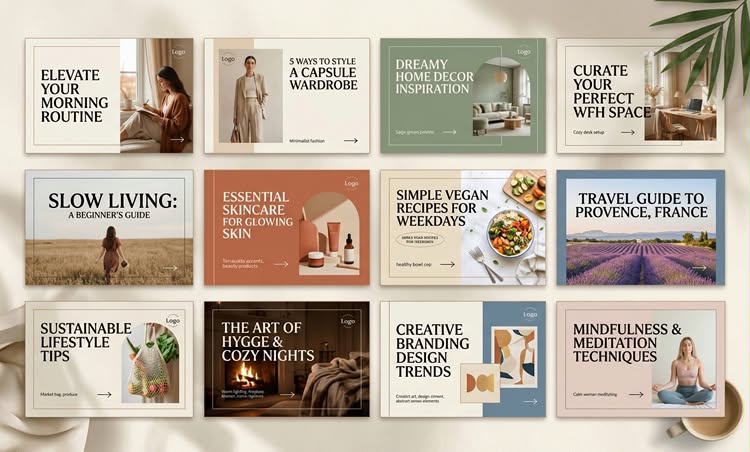
Finding great long-tail keywords on Pinclicks is only half the battle. To rank quickly, you need to place those keywords in the right spots on Pinterest so the algorithm knows exactly what your content is about.
Here are the key places you must optimize:
1. Pin Title
Put your main long-tail keyword near the beginning of your pin title. Make it sound natural and enticing, not robotic.
Bad: Satin Dress Outfit Satin Dress Style 2026
Good: 15 Ways to Style a Satin Dress for Effortless Chic Style
2. Pin Description
Write 2 to 3 conversational sentences explaining what people will learn or see when they click your pin. Naturally sprinkle 2 to 3 long-tail keywords you found on Pinclicks into your text. Avoid random lists of floating keywords.
3. Pin Overlay Text
The text on your actual image graphic matters. Pinterest uses visual recognition software to read the text written directly on your images. Ensure your main title phrase appears clearly on your pin graphic.
4. Board Title and Description
Save your pins to boards that share the same topic family. If your pin is about green satin dress outfits, place it on a board titled Satin Dress Outfits & Styling Tips with a fully keyword-optimized board description.
3 Common Mistakes Beginners Make with Pinclicks
To save you time and headaches, here are three mistakes to steer clear of when doing keyword research:
1. Targeting Keywords That Are Too Broad:
Do not fall into the trap of picking massive keywords just because they have huge monthly volume. You will get out-ranked by accounts with millions of monthly views. Stick to long-tail terms.
2. Keyword Stuffing:
Avoid listing words separated by commas in your pin description. Write human-friendly, conversational sentences. Pinterest penalizes accounts that look spammy.
3. Ignoring Image Quality:
Pinterest is a visual search platform. Even if you use the absolute best Pinclicks keywords, people won’t click on an unappealing or blurry pin graphic. Pair your smart keywords with clean, attractive pin designs.
Final Thoughts: Start Researching and Stay Consistent
Keyword research does not have to be confusing or overwhelming. By using Pinclicks to uncover high-intent, low-competition long-tail keywords, you give your pins a clear blueprint to rank faster in 2026.
Start small. Pick one upcoming blog post or content topic today, run your seed keyword through Pinclicks, collect 5 solid long-tail keywords, and apply them across your pin titles, descriptions, and boards. Stay consistent, monitor your analytics, and watch your Pinterest search traffic steadily grow.
Ready to boost your Pinterest traffic? Head over to Pinclicks today, run your first search, and start optimizing your pins for fast rankings. Drop a comment below if you have any questions or need help finding your first keyword!