When I first opened Pinterest years ago, I used it like everyone else: saving aesthetic wallpapers. I had zero clue that Pinterest is actually a massive visual search engine where millions of people go with their credit cards ready to shop and discover new products.
Once I figured out that Pinterest allows outbound links—meaning you can drive thousands of targeted readers directly to your website, blog, or store—everything changed. I realized this platform could literally become an automated traffic machine worth thousands of dollars.
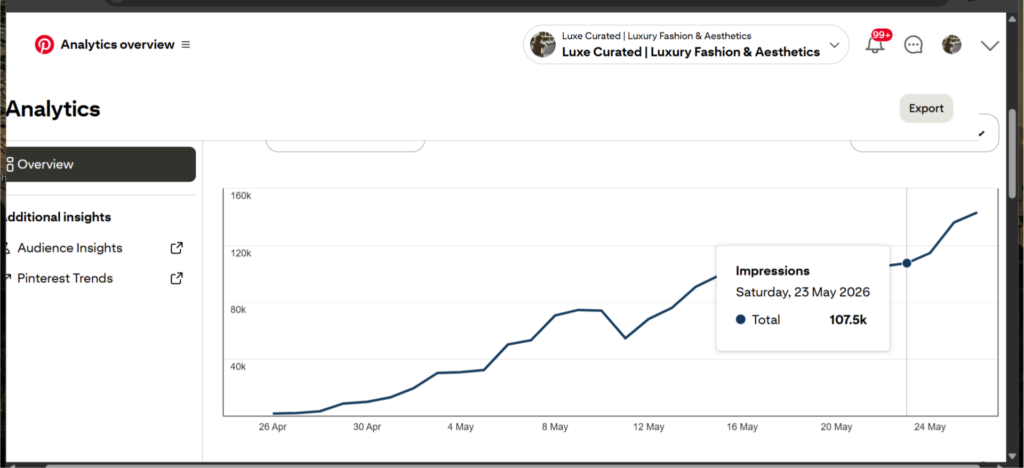
Fast forward to today: I took a brand-new account from 0 to over 1M+ Pinterest impressions in my very first month. I am now sitting at over 7M+ Pinterest impressions monthly and 15 million+ total views in just three months.
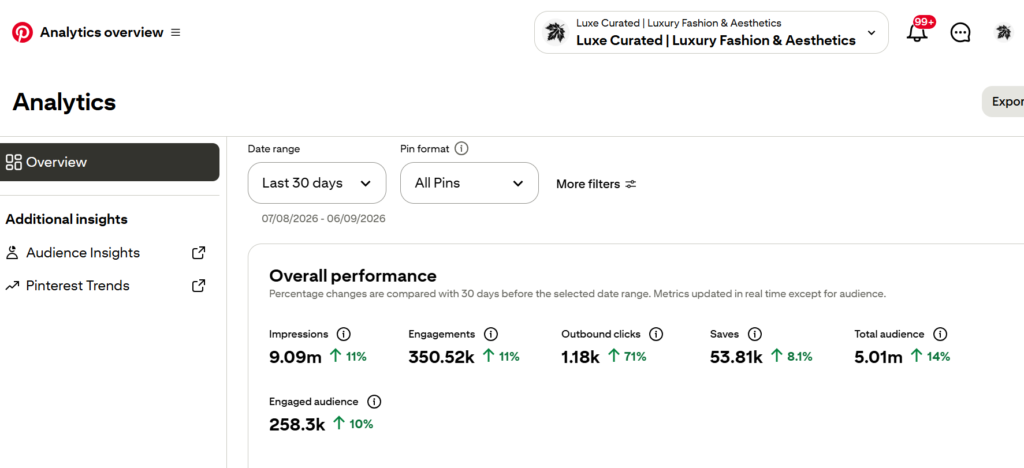
Note: My outbound clicks are low because I recently created my blog, so only a few of my pins have website links.
If you have searched on Google, you have probably read that growing a Pinterest account takes 6 to 12 months. That is a myth. In my experience, there is a strict 20-day algorithm warm-up period where your account stays quiet, even with high-quality pins. But once you cross that 20-day threshold with the right technical SEO strategy, the traffic explosion happens fast.
In this step-by-step Pinterest growth guide, I am sharing the exact blueprint, tools, and technical setup I used to blow up my traffic—without fake promises, fluff, or gatekeeping.
7M+ Pinterest Impressions In 30 Days
The Proof: My First Month Growth Analytics
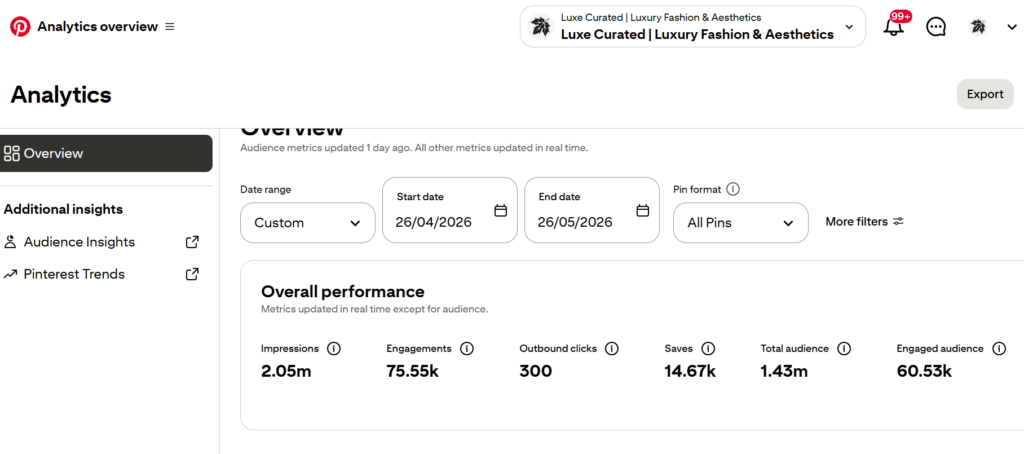
As you can see in the analytics above, I hit nearly 2 million+ impressions right out of the gate in month one.
A quick word of warning regarding outbound links: Early on, your focus should be building domain trust with Pinterest. In the first few weeks, do not spam every pin with outbound affiliate or blog links. (That’s what I did—I used outbound links in a few pins) Post a healthy mix of value pins and link pins. Never publish dozens of links per day on a brand-new profile, or Pinterest’s spam filters will instantly flag your domain.
Rule 1: The Daily Consistency & Volume Limit System
Consistency is the single most important ranking signal for the Pinterest algorithm. However, more is not always better.
Quality over Quantity
Focus on publishing 3 to 5 high-converting, 2:3 ratio pins (1000 x 1500 px) per day. Publishing 3 pins optimized with long-tail visual keywords will perform 10x better than spamming 20 low-quality images with zero search optimization.
The New Account Safety Rule
If your account is less than 30 days old, do not exceed 5 pins per day. Pushing massive volume on a fresh IP or domain triggers automated anti-spam bots and can get your account shadowbanned or suspended.
Technical Tools to Build High-Converting Pins
To create sharp, high-CTR (click-through rate) pins fast, use professional visual automation tools:
- Canva Pro: The ultimate design tool for scaling vertical graphics. Use their pre-built 2:3 Pinterest templates, custom typography, and bulk-create features to batch a week’s worth of pins in 30 minutes.
- Tailwind: The official Pinterest-approved scheduling and automation partner. Tailwind allows you to smart-schedule your 3–5 daily pins at peak audience hours without sitting at your laptop all day.
Rule 2: Advanced Visual SEO & Long-Tail Keyword Targeting
Pinterest does not read images the way humans do. It relies on text data, contextual metadata, and image recognition algorithms to decide who sees your pins.
To get your pins pushed to the “Smart Feed” and “Search Results,” you must embed high-intent keywords across five core technical areas:
1. Pin Title: Put your primary long-tail keyword right at the beginning.
2. Pin Description: Write 2–3 natural sentences incorporating secondary semantic keywords.
3. Alt Text: Describe the image visually for search engines using target terms.
4. On-Image Text Overlay: Bold, high-contrast text on the graphic itself (Pinterest OCR reads this text).
5. Board Titles & Descriptions: Organize keywords neatly into dedicated boards.
The more users Save (repin) your graphics, the more the algorithm considers your content authoritative and pushes it to millions of home feeds.
Rule 3: The AI Prompt Modification Method for Infinite Viral Pins
Many creators think AI-generated images do not go viral on Pinterest because they look fake or generic. Here is the secret trick I use to create viral visual assets daily:
Instead of generating a prompt from scratch, find a trending visual in your niche that already has thousands of saves. Upload that image into an advanced image-to-image AI tool and prompt it to make smart aesthetic modifications.
For example, if a photo of a model in a black dress is going viral, instruct the AI: “Keep the exact pose, background, and cinematic lighting, but change the dress color to aesthetic off-white silk.”
This allows you to leverage proven composition frameworks while creating 100% original, copyright-free “fresh pins” that search engines love.
Top AI Tools for Pin Generation:
- Midjourney: The gold standard for ultra-photorealistic fashion, interior design, and lifestyle rendering.
- Leonardo.AI: An exceptional AI generator with fine-tuned control models, ideal for generating dynamic lifestyle visual assets with precise prompt editing.
- Gemini: After all, if you are looking for an easy, free, and common option, then choose Gemini. It’s the best one, and it’s the one I used myself when I first started. The only problem is that it adds a watermark in the corner, but don’t worry—you can simply crop it, or use a healing tool to remove the logo. I used Snapseed for that. Haha.
Rule 4: Niche Selection & Strategic Board Architecture
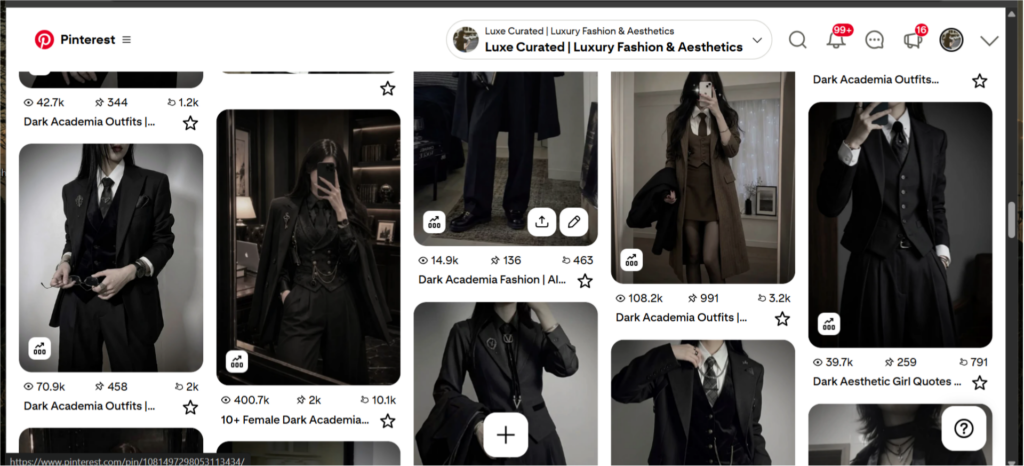
Not all niches scale at the same speed on Pinterest. If you want ultra-fast traffic, visual-heavy categories like Home Decor and Fashion/Apparel dominate the platform. While I run accounts in multiple niches, my fashion properties scale at double the speed of anything else.The screenshots i posted are also from my fashion account.
The “Gold Mine” Sub-Niche Strategy
Within broad categories, find high-intent micro-niches. For example, in fashion, Dark Academia and Minimalist Capsule Wardrobes are absolute gold mines. Every time I post a tailored suit graphic or classic trench coat layout under these sub-topics, it consistently pulls thousands of impressions within hours.
Architect Your Account with Categorized Boards
Never throw random topics together into generic boards. Structuring your account with surgical precision makes it easier for users to hit “Follow” and helps Pinterest understand your site structure.
- Incorrect: One giant board named “Fashion Outfits.”
- Correct (The Cluster Method):
- Board 1: Black Dress Outfits & Styling
- Board 2: Floral Summer Wardrobe
- Board 3: Dark Academia Aesthetic Tailoring
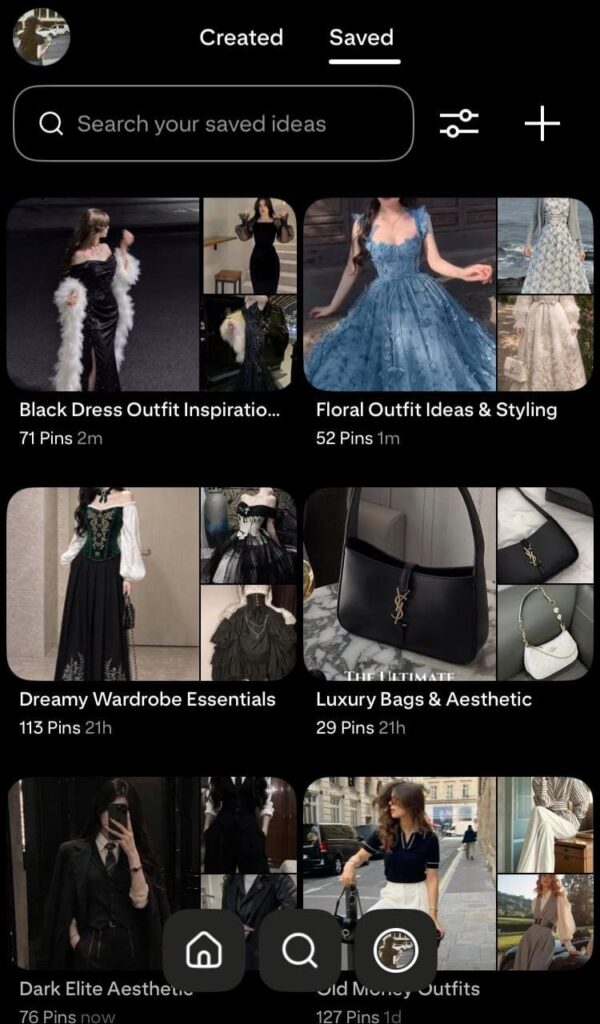
Notice how clean this organizational structure is? Unlike platforms like Instagram or TikTok where follower count strictly dictates your reach, on Pinterest, followers do not determine your views—SEO architecture does.
💡 A Quick Reality Check for New Creators (Don’t Quit Yet!)If you have been pinning consistently for 5, 10, or even 15 days and are looking at a flatline of zero impressions—do not panic, and absolutely do not quit.The Pinterest algorithm is not ignoring you; it is evaluating you. Think of the first 20 days as a silent test where the system checks your consistency, indexing metadata, and domain safety. Most creators dump 10 pins in their first week, see no returns, and delete their accounts claiming “Pinterest is dead.”The data proves otherwise. Growth on a visual search engine is exponential, not linear. Every single viral account sitting at millions of views today started with weeks of absolute silence. Trust your keyword architecture, stick strictly to your 3–5 daily pin routine, and give the algorithm the technical time it needs to clear your sandbox. Your explosion is just on the other side of that 20-day threshold!
Frequently Asked Questions (FAQs)
While Pinterest has a technical algorithm warm-up period of about 20 days for brand-new accounts, properly SEO-optimized fresh pins can start picking up impressions significantly within the first 2 to 3 weeks.
Yes, Pinterest allows high-quality visual content. The key is to avoid generic or fake-looking AI renders. Using advanced tools like Midjourney and modifying trending compositions ensures your viral visuals stay authentic and safe.
No, Pinterest actively encourages outbound links to high-quality websites. However, to keep your domain safe, avoid spamming heavy link volumes on a new account (under 30 days) and maintain a balanced mix of value-pins and outbound link pins.
Final Thoughts & What’s Next
Scaling a Pinterest account to millions of impressions isn’t magic; it’s a technical system of consistency, precise keyword placement, and smart visual automation. If you stick with the process through those initial 20 days, the algorithm will reward you with massive traffic momentum.
Your Pinterest profile isn’t just a mood board—it can easily become an automated traffic and affiliate revenue engine for your business.
Want to convert these impressions into blog clicks and revenue? Check out my Blogging for Beginners: Ultimate Website Setup Guide to get started!